Overview

Speech-to-text, text-to-speech, llm pipelines and managing conversation state is a pain (trust us). Veform is here to simplify the whole process without forcing you to compromise your vision or rework your existing input logic.

The value offer here is simple. This is a pain to implement and maintain yourself, there are many pitfalls and uncertainties. This could either be a months long project across multiple platforms that needs to be maintained and updgraded into the future or a few hours one time setup with Veform.

Why not just do it myself?

  • Additional services need to be created. You will need to support and maintain websockets or SSE connections.
  • Speech-to-text is simple on the surface, but complex in practice and difficult to orchestrate around audio output.
  • No need to self-host or manage infrastructure for LLMs.
  • Easily add to iOS, web and Android apps for a unified experience, no need to write 3X implementations.

Conversations are not deterministic or consistent, audio input/output is not easy to get reliable and fluid. Let us sink deep into the weeds on those topics so you can build focus on your users.

Installation

Download the library lol

High level architecture

To make things fully transparent here is what Veform is doing under the hood. Each of these pieces seems simple, but is packed with complexity to handle and smooth over all the edge cases that can occur. Audio input/output, websockets and LLM generated replies is a lot of moving pieces to prioritize and organize in a way that feels natural for users.
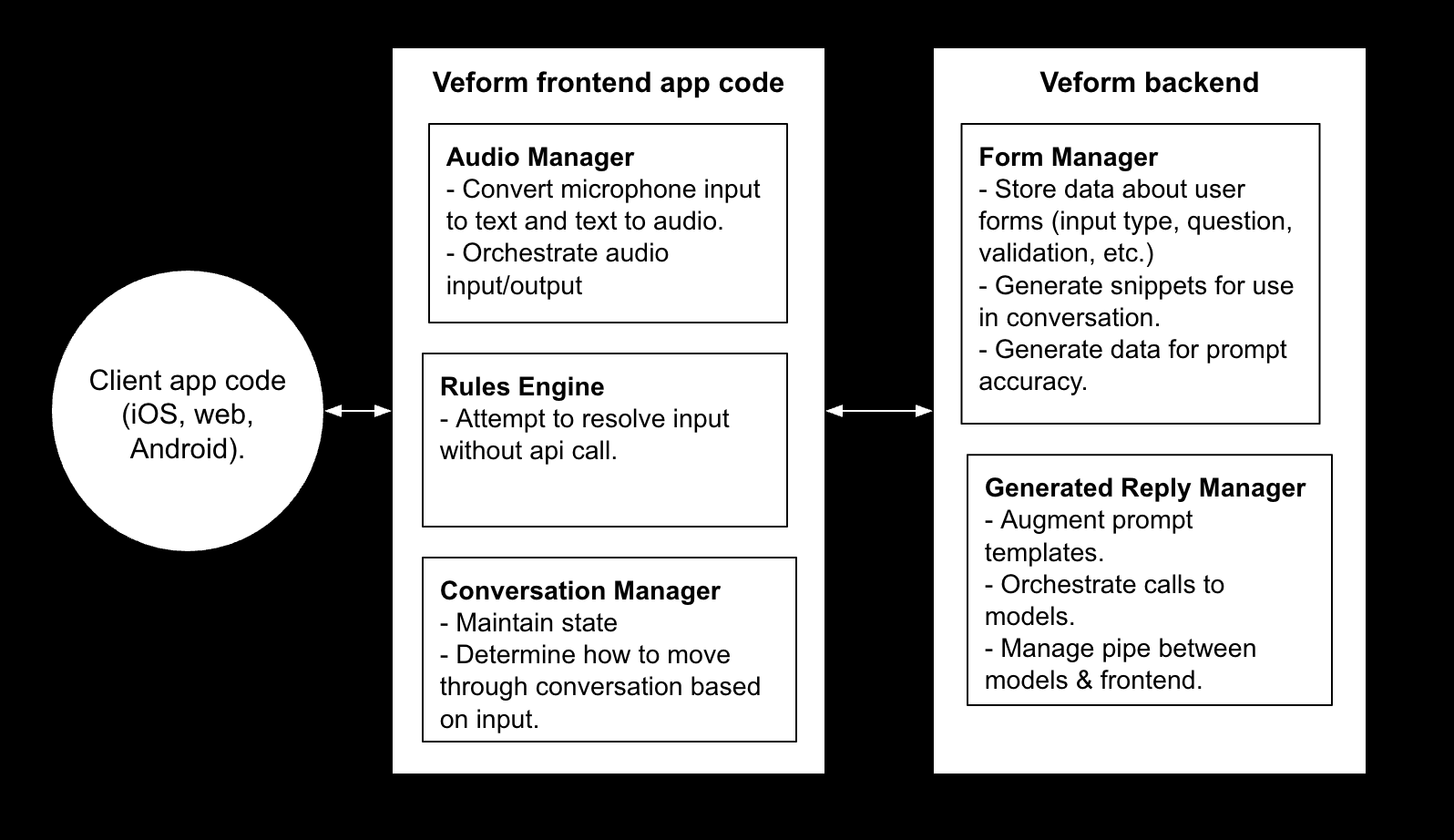
High level architecture

Reference

Functions

Veform constructor
Instantiates a new veform instance with the API Key. This is used for interactions and control over the conversation. Data input via the conversation is accessible here.
Note: Information about the conversation will be lost once this instance is destroyed. You will need to process/store this data yourself before this instance gets discarded. We don't store conversation data.

Veform constructor

const veform = new Veform(apiKey: string);
                        

let veform = Veform(apiKey: string);


OnEvent(event, fieldState)
Callback function that fires whenever an event occurs internally. This can be leveraged to build any kind of UI you want. Plug into every even to trigger your own responses to ConversationEvents.

OnEvent(event, fieldState)

veform.onEvent((event: ConversationEvent, fieldState: FieldState) => {
    if (event === ConversationEvent.AUDIO_IN_MESSAGE) {
        document.getElementById(fieldState.id).value = fieldState.answer;
    }
});
                          

veform.onEvent { [weak self] event, fieldState in
    if event == .audioInMessage {
        viewModel.updateField(fieldState.id, fieldState.answer)
    }
};


onComplete(handler)
Callback function that is called when the conversation is complete. Returns the final ConversationState with all fields in a valid state.

onComplete

veform.onComplete((conversationState) => {
    fetch("/api/submit", {
        method: "POST",
        body: JSON.stringify(conversationState),
    });
});
                    
onComplete

veform.onComplete { [weak self] conversationState in
    print(conversationState)
};
                    

start(formId)
Start the given formId. After running this permissions will be requested and the audio conversation will begin.

onComplete

  veform.start("abcd");
                      
onComplete

  veform.start(formId: "abcd")
                      

listForms()
Returns a list of all forms you have created.

onComplete

  veform.listForms().then((forms) => {
      console.log(forms);
  });
                      
onComplete

  veform.listForms { [weak self] forms in
      print(forms)
  };
                      

Types

Form
Returned from /form/:id. Contains data about a form you have created previously.

Form type

type Form = {
    id: string;
    name: string;
    fields: [{
        name: string;
        type: FieldType;
        question: string,
        id: string
    }];
};
                    

FieldState & ConversationState
Represents the state of the conversation at any given time. Returned from onComplete when the conversation is completed.

Form type

type FieldState = {
    id: string;
    fieldName: string;
    question: string;
    answer: string | number | null;
    type: FieldType;
    valid: boolean;
}
type ConversationState = FieldState[];
                      

Conversation Events
Events dispatched as the conversation is progressing.

ConversationEvent enum

enum ConversationEvent: String {
    case audioInChunk
    case audioInMessage
    case audioOutChunk
    case audioOutMessage
    case listening
    case speaking
    case fieldChanged
    case genReplyRequestStart
    case genReplyRequestEnd
    case error
}
                        

Examples

Pure Audio Conversation


function startConversation() {
    const veform = new Veform("dummy-api-key");
    veform.onComplete((conversationState) => {
        fetch("/submit", {
            method: "POST",
            body: JSON.stringify(conversationState),
        })
    });
    veform.start("abcd");
}
                      

                let veform = Veform(apiKey: "dummy-api-key");
                veform.onComplete { [weak self] conversationState in
                    print(conversationState)
                };
                veform.start(formId: "abcd")
                      

Autofill UI while having a conversation


function startConversation() {
    const veform = new Veform("dummy-api-key");
    veform.onEvent((event, fieldState) => {
        if (event === ConversationEvent.FIELD_CHANGED) {
            if (!fieldState.valid) {
                document.getElementById(fieldState.id).classList.add("error")
            } else {
                document.getElementById(fieldState.id).classList.remove("error")
            }
        }
        if (event === ConversationEvent.AUDIO_IN_MESSAGE) {
            document.getElementById(fieldState.id).value = fieldState.answer;
        }
    });
    veform.onComplete((conversationState) => {
        fetch("/submit", {
            method: "POST",
            body: JSON.stringify(conversationState),
        })
    });
    veform.start("abcd");
}
                      

                let veform = Veform(apiKey: "dummy-api-key");
                veform.onComplete { [weak self] conversationState in
                    print(conversationState)
                };
                veform.start(formId: "abcd")